-1.png?width=2000&height=864&name=bioniqLogo%20(2)-1.png)
The entry point is when a person submits this form:
https://kb.bioniq.com/knowledge/kb-tickets/new
This form is reachable over the knowledge base.
This means that the user has already a received an autoreply email from us:
https://app.hubspot.com/workflows/4726638/platform/flow/542296612/edit
Links
| Pipeline | https://app.hubspot.com/contacts/4726638/objects/0-5/views/all/board | if the direct link doesn't work, search for "Support Pipeline" |
| Pipeline Name | Support Name | |
| Pipeline Operators | Currently, Valerie & Polina | |
| Pipeline Tech owner | Igor |
Please review the process steps below:
| Steps | ||
| Ticket Created | https://kb.bioniq.com/knowledge/kb-tickets/new | form submission |
| Rotate the ticket owner between GO team | https://app.hubspot.com/workflows/4726638/platform/flow/322695704/edit | workflow |
| Now, we go to the ticket, and send an email from the ticket | example link: https://app.hubspot.com/contacts/4726638/record/0-5/3690853276/ |
Click "send email" from within the ticket. Be sure to send it from GO. Detailed below |
| When Bioniq sends an email (first or in thread) | https://app.hubspot.com/workflows/4726638/platform/flow/614506407/edit | sets the status to "with customer" |
| When customer replies | https://app.hubspot.com/workflows/4726638/platform/flow/614506408/edit | sets the status to "Waiting on Bioniq" |
| When no reply from customer for more than 7 days | https://app.hubspot.com/workflows/4726638/platform/flow/614506518/edi | auto closes the ticket |
Please find visual representation of the above process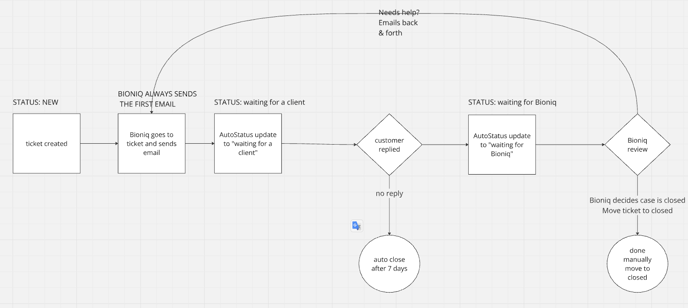
https://miro.com/app/board/uXjVLbHJfw8=/
HOW I WOULD ORGANIZE MY DAY TO DAY WITH SUPPORT
Of course, the final decision is your call.
This is just my proposal how I would work with this pipeline.
1. Work start - Go to support tickets pipeline
2. Always have it open during work time
3. Tough one - teach myself to not be bothered by conversations - we work with tickets now.
4. Review New & Waiting for Bioniq
5. Reply promptly over the email
6. If the backlog grows, ask for help of other colleagues - we have tickets, therefore it is easier to ask for support for an individual case. If need be, a person can leave a note in the ticket as well.
What's most important
1. We have to teach ourselves to not work with conversations anymore - will be tough
2. WE send the first email
3. WE send the email from ticket! Never from conversation.
What about the old conversations?
The queries raised prior to Go Live (i.e. created before 27.09) we will have to work through manually following the process. Maybe we can ask support from PRO team.
Details
We move away from conversations in favor of individual ticket work
Example link of the ticket:
https://app.hubspot.com/contacts/4726638/record/0-5/3690853276/
Once the ticket has arrived, and it's New, WE must send the first email!
Go to the ticket.
You can click the "email" icon as on the screenshot.
Then compose the email, be sure to send it from go@bioniq.com.
Be sure to do it from the ticket view and not conversations. 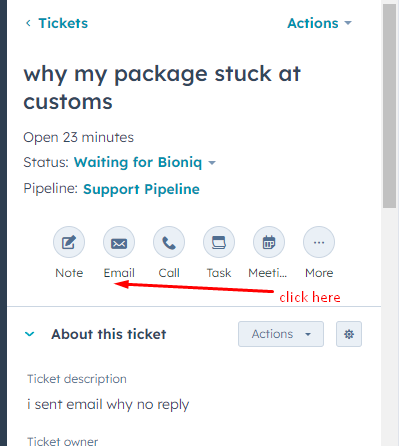
When you send the email, the automation will move the ticket to "Waiting for Client"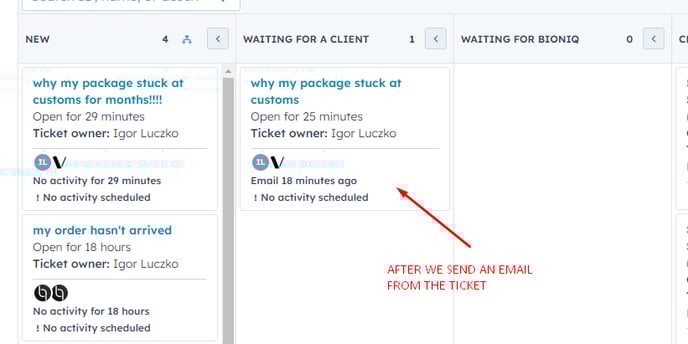
In here, few things can happen:
a) customer will reply to us
b) no reply for more than 7 days - then the ticket is automatically moved to "closed automatically" - WE NEED AN EMAIL FOR THAT TO THE CUSTOMERS. THIS CLOSES THE CASE.
Let's discuss scenario a) when the customer replies to us.
1. The ticket will be moved automatically to "Waiting on Bioniq"
2. Open the ticket
3. Find the email thread and click "Reply"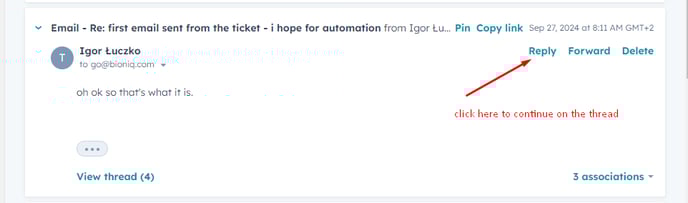
4. Once you send, this will move the ticket back to "Waiting for a Client", and we're back with
a) customer will reply to us
b) no reply for more than 7 days - then the ticket is automatically moved to "closed automatically" - WE NEED AN EMAIL FOR THAT TO THE CUSTOMERS. THIS CLOSES THE CASE.
5. At some point, customers will be happy - then simply move the ticket manually to "closed".